The Ultimate Guide to Google Ads Performance Max Campaigns [Updated in 2026]
Traditional Google Ads are a simple machine: insert your keywords, and Google will serve them. But with Google Ads Performance Max campaigns, the machine has started learning.
Performance Max (PMax) is different. It uses AI across all of Google’s placements from one campaign. The promise is alluring: automation + broad reach = more conversions.
But the reality is more nuanced.
This article isn’t a generic “how-to.” It explains what actually matters with Performance Max today – what changed in 2026, how advertisers can control it, and what mistakes I see in real accounts’ audit data.
What Are Google Performance Max Campaigns?
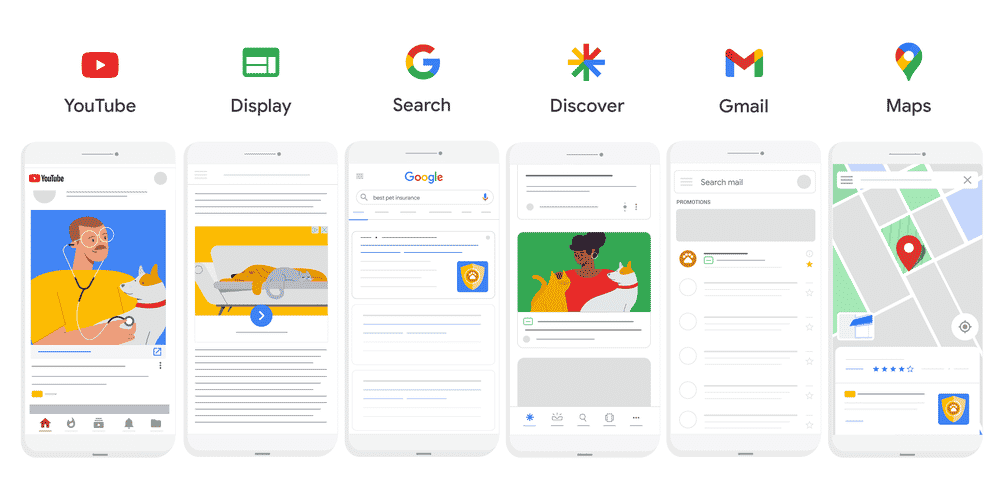
Performance Max campaigns (pMax) are an automated Google Ads campaign type. Unlike traditional ads, where you have 1 campaign per channel, Performance Max lets you share a single campaign across different campaign types:
- YouTube
- Search (and AI Overviews)
- Display
- Discover
- Gmail
- Maps
- And, from November 2025, Waze, too!
… all it needs is your initial input on conversion goals, creative assets, audience signals, and (optional) search themes. Once provided, Google’s AI will learn from your campaign and existing profitable audiences to find more people like them and expand your market for you.
That’s the theory.
But if you’ve worked with enough accounts the way I have, you’ll know there are three important truths behind this promise:
The Problem (and the Truth) Behind Performance Max Campaigns
1. Performance Max Is Not a Replacement for Strategy – It’s a Machine That Amplifies Your Inputs
In audits, the thing that kills most Performance Max accounts isn’t the AI – it’s what the AI is fed.
PMax doesn’t care about your business goals unless you define them clearly. If your conversion tracking is messy, if your negative keyword list is empty, or if you ship low-quality audience signals into your campaign, the AI optimises toward whatever data you gave it.
I’ve seen accounts where:
- PMax was optimising for micro-conversions because that’s all it had to go on
- PMax was generating hundreds of clicks that never turned into real leads
- Advertisers assumed it “wasn’t working,” when the real problem was bad signals + unfiltered inputs
This is the exact pattern that turns Performance Max from a powerful tool into a budget drain.
2. Performance Max Still Operates Across Multiple Channel Types (But You Finally See Where It’s Spending)
One of the biggest complaints about PMax for years was no visibility. You couldn’t tell where your spend was going – whether it was Search, Display, YouTube, or Gmail.
In 2025/2026, Google introduced channel-level reporting, which did exactly what we begged for: showed us where our conversions and spend were coming from, not just that conversions happened.
This doesn’t give you full keyword visibility (still no keywords the way Search does), and it doesn’t let you control every nuance of placement, but it does mean you can start spotting issues like:
- PMax sending too much budget to Display/YouTube for bottom-of-funnel goals
- PMax cannibalising your Search budget because it defaults to broad AI optimisation
- PMax optimising toward low-quality placements because it lacks strong audience signals
This transparency is vital. After all, one of my most common audit findings over the past couple of years has been that accounts were bleeding clicks in the wrong places because nobody could see it.
3. Performance Max Optimises for the Conversions You Tell It Matter
Google still optimises toward conversion events, not intent signals_,_ the way keyword Search does.
That’s why if your conversion tracking includes page views, scroll depth, or button clicks, PMax optimises to that – and not necessarily to revenue or qualified leads. And if you have weak conversion goals defined, the AI finds the easiest conversions – not the ones you actually care about.
I regularly see audits where:
- A PMax campaign generated tons of “conversions” that were actually form opens or auto-modal triggers
- True lead conversions weren’t being counted properly
- The AI continued to optimise toward the wrong goals for weeks
And because Performance Max is so automated, these problems don’t push alerts the way they would in a well-structured Search campaign.
This is why I always say:
“AI is only as good as the data you give it.”
Without clean conversion definitions, you’re watching Google optimise toward chaos, and paying for it.
Ultimately, Performance Max isn’t a shortcut. It’s a different machine with different risks.
One of the core audit patterns I always see is the automation trap. People think: “If Google can automate placements, it must get better results.”
In reality:
- PMax can spread budget to areas that make visibility harder
- It can drown out your structured Search campaigns if not monitored
- It can optimise toward low-quality conversions if conversion tracking is weak
- It can cannibalise traffic you meant for specific, high-intent keywords
Many PPC experts call PMax “Black Box” – and even though transparency has improved, it still behaves like a black box unless you feed it strong data and controls.
Automation is not a strategy. It’s an amplifier.
How to Win with PMax
I’ll show you how in the rest of this article, based on the PMax campaigns I’ve run for my clients. The ones getting the best results…
- Fix their tracking before launch
- Use robust negative keyword lists (yes – campaign-level negatives are now supported)
- Structure audience signals carefully
- Use PMax with Search campaigns, not instead of them
- Regularly audit placement performance data
In other words:
The campaigns that outperform aren’t those that hand data to Google and hope for the best. They’re the ones that control what goes in, and then let Google do the learning.
That’s the difference between AI that amplifies strategy and AI that amplifies noise.
Why You Should Still Consider Performance Max Campaigns
I’ll be honest: I’m not a fan of Google Ads’ automation. A few of my Google Ads coaching clients switched to me because their agencies forgot to tick off small automation settings, resulting in a massive waste of their budgets.
However, we can’t deny that Google is automating more and more. It also has access to valuable advertising data. And, when it’s paired with a PPC expert, the Performance Max AI produces excellent results:
Performance Max Sees Patterns You Couldn’t Spot Manually
This is where PMax earns its place.
Google’s machine learning digests billions of data points – not just keywords – and surfaces patterns of user behaviour that are too subtle for manual campaigns to catch.
For example:
- Users whose paths include both Search and YouTube before converting
- Users who behave like your best customers even if they don’t use obvious keywords
- Audiences your competitor campaigns never reached
This is the part of the AI that isn’t about automation noise, but pattern discovery.
Asset Groups Provide More Conversion Options
Just like responsive search ads, you can upload multiple assets to your Performance Max campaigns.
Then, Google will test multiple asset combinations. You can significantly increase your conversion rate if you structure your Performance Max campaign account correctly. After 2025 updates, we’re also seeing better experiment options for Performance Max assets.
Performance Max Sees Patterns You Couldn’t Spot Manually
This is where PMax earns its place.
Google’s machine learning digests billions of data points – not just keywords – and surfaces patterns of user behaviour that are too subtle for manual campaigns to catch.
For example:
- Users whose paths include both Search and YouTube before converting
- Users who behave like your best customers even if they don’t use obvious keywords
- Audiences your competitor campaigns never reached
Channel-Level Reporting Means You’re Not Flying Blind
One of the biggest mistakes I saw in early PMax accounts was businesses thinking it was “working,” but having no idea where the results were coming from. This meant that PMax could claim it generated business, when it reality it was just claiming branded organic search traffic.
These days, channel-level reporting shows you how your Performance Max budget and conversions break down across Search, YouTube, and other placements. You still can’t fully choose which placements your ads will show up in, but you get significantly more visibility.
Campaign-Level Negative Keywords Are One of the Best Performance Max Guardrails (But There Are More)
Recently, Google introduced campaign-level negative keywords into Performance Max. You can now stop known junk queries and protect your budget the same way you would in a Search campaign.
This is not a small update – it’s an important guardrail for shutting down wasteful traffic early.
Other guardrails I recommend to my clients include demographic and device controls. This means you can bias automation toward your best leads, especially in professional niches where certain demographics convert at much higher rates.
Fill in the Knowledge Gaps with Search Themes
Performance Max’s AI may be powerful, but you know your audience best. That’s why Google, starting from 2025, allows you to add up to 50 of the so-called “search themes” to each pMax ad.
Think of search themes as phrase or broad match keywords, there to help Performance Max understand your audience and the way they search better. For example, if you know of some data that’s not displayed on your landing pages or keywords that Google hasn’t thought to add to your campaign targeting, use search themes to fill in the blanks.
(This is especially helpful when you first launch a pMax campaign and there’s no historical data for Google Ads to base its predictions on.)
How to Set Up Your Performance Max Campaign
Step 1. Define Your Performance Max Campaign Objective, Type, and Conversion Goals
You can launch your Performance Max campaign from the Google Ads Manager:
- Choose your objective -> “Create a campaign without a goal’s guidance.”
- Select a campaign type -> “Performance Max”
Performance Max Conversion Goals
Come as close to the actual conversion event as possible (e.g., adding to the cart) and pause anything that’s not a direct conversion (e.g., mailing list sign-up).
When you pause secondary conversion actions, you’ll still be able to monitor them, but they won’t be treated as conversions.
This has twofold benefits: firstly, you want to make sure your settings are precise so Google’s AI doesn’t accidentally optimise your account for non-converting actions. Remember: Performance Max bids and optimises toward your conversion actions. If those actions are noisy or meaningless, the AI will learn the wrong thing.
Secondly, Performance Max is by nature a conversion-first ad type. It wants to learn which people convert on your website. Even if you run a lead generation campaign, you can use Enhanced Conversions for Leads to make the data as precise as possible.
Make sure you confirm your Google Ads conversion tracking is set up accurately and you’re tracking true leads, not vanity metrics like scroll depth.
Learn how to set up Google Ads conversion tracking in my in-depth guide.
2. Set Your Performance Max Budget & Bidding
The golden rule of Performance Max is experimentation. Google’s AI needs a lot of data to optimise your campaigns, which means a lot of clicks. So, if you run ads without expert help and don’t have a budget of at least $2,000 per month, opt for a traditional Google Ads campaign instead.
At the very least, your daily Performance Max budget should be 3-5x your cost per conversion (for the campaign conversion goals).
For example, if your cost per conversion is $10, your daily budget should be at least $30.
Performance Max also has the “Budget Pacing” feature, which you can use to understand how your budget is distributed across campaigns. Personally, I don’t find this really useful since it’s not as granular as traditional campaigns, but it could give you some insights into how Google is distributing your money.
Performance Max Bidding
Since Performance Max is all about performance, use Maximise Conversions or Maximise Conversion Value as your bidding strategy.
You can set a target CPA or a target ROAS with both.
For example, if you own an online shop, target a higher Average Order Value with the Maximise Conversion Value bidding strategy to get higher returns on your ad spend.
Step 3. Final URL Expansion
Final URL expansion lets you choose if you want Google to send traffic to a specific page you selected or leave it for the AI to decide.
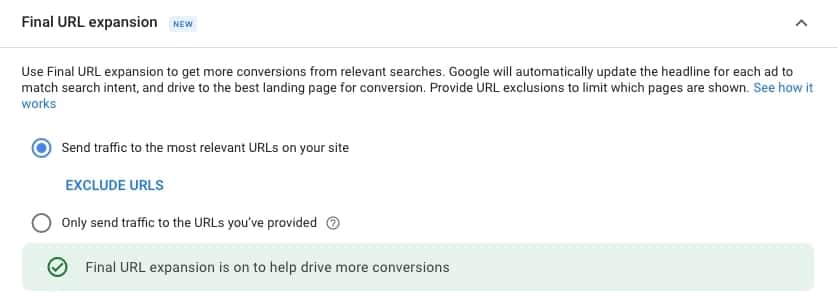
If you choose the latter, Google’s AI will experiment with different landing page URLs to maximise conversions.
For example, your plumbing ad may send leads to your plumbing services landing page, your ‘About’ page, or a different page entirely.
Step 4. Performance Max Asset Groups and the Ideal Campaign Structure
Performance Max’s asset groups are similar to ad groups and responsive search ads. Like RSA, you provide the ad assets, and Google tests them to determine the winning combination.
Performance Max Asset Types
You can add plenty of assets to your campaigns, including logos and videos:
Performance Max asset
Limit
Headline
Up to 5
Long headline
Up to 5
Description
Up to 4
Display URL path
Up to 2
Images
Up to 15
Logos
Up to 5
Videos
Up to 10
Videos are required. If you don’t upload a YouTube video of your own (or upload your video directly to Performance Max), Google will generate one for you.
Google’s video won’t be anything to write home about. Most of the AI-generated videos for pMax will look like a two-hour Windows Movie Maker project. So even if video isn’t your top acquisition format, don’t waste the click, especially since most of your Performance Max competitors are cutting corners and avoiding high-quality videos.
How to Organise Your Performance Max Asset Groups
If you target different audience segments (e.g. enterprises and small businesses), set up two campaigns rather than two asset groups.
Then, organise asset groups by audience signals.
For example, you might target the audience’s search history with one asset group and demographics with the second.
Target the right intent level by mapping audience signals to your asset groups. If you try to optimise for different intent levels simultaneously, you’ll see lower performance across your campaign.
You’ll get significantly better results if you create different asset groups for different funnel stages:
- Top-of-the-funnel (unaware, targeted with previous searches or downloads)
- Middle-of-the-funnel (problem-aware but not thoroughly convinced, targeted with detailed demographics and interests)
- Bottom-of-the-funnel prospects (solution-aware, targeted with your first-party or remarketing data)
The key is _not to mix them up_. Remember: optimising for everything means not optimising for anything in particular.
A Note on Automatically Created Assets (ACAs)
Since Google is going all-in on AI, there’s an option for it to create your assets for you. Don’t agree to it blindly.
With ACAs in Performance Max, Google can auto-generate descriptions and headlines for your ads. This is a nice idea in theory, but, in practice, it could lead to some overlap if Google were to, for example, generate a headline that doesn’t match any of your descriptions.
If you do test, test carefully! And if you decide this option works for you, make sure your landing pages don’t contain any copy that could be misinterpreted or images that you wouldn’t like to use in your ads.
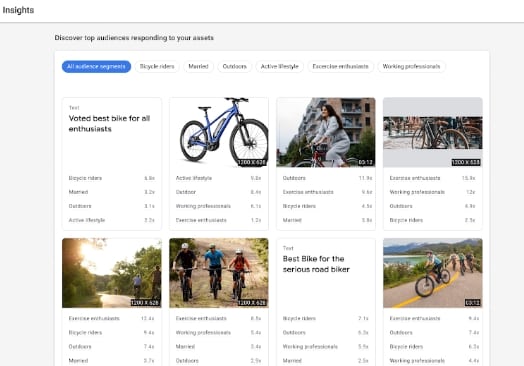
Step 5. Targeting with Audience Signals
Unlike traditional Google Ads, Performance Max campaigns have a combination of different audience signals:
- Custom segments (target prospects based on their search activity, app installs, website visits)
- Your own customer data (remarketing lists, CRM lists, Customer Match, etc.)
- Interests & detailed demographics (target prospects based on their demographic makeup, interests, life events, etc.)
- Demographics (gender, age, parental status, etc.)
- Search themes
For example, if you’re a real estate agent, you could target people who recently visited websites like Zoopla or Zillow with custom-segment targeting. Yes, even if you’re not the website owner!
How Do I Add Keywords to Performance Max Campaigns?
You can’t add keywords to Performance Max campaigns directly. However, you can add search themes. Keep in mind that your pMax ads may not be served to these specific audiences. Google employees say it’s best to use audience signals as starting points.
Then, the AI will find shared characteristics between your existing profitable audience and new audiences who behave the same way.
Step 6. Ad Extensions
Performance Max doesn’t offer unique ad extensions, but add all the relevant ones to get more SERP real estate. Don’t overdo it. Keep all the extensions relevant and ensure they match different asset combinations.
Step 7. Apply Campaign-Level Negative Keywords
If you don’t block junk, you’ll pay for junk. Add the following to your negative keywords list:
- Words that aren’t part of your buyer’s intent
- Terms associated with informational or irrelevant traffic
- Brand or competitor terms you don’t want if they’re not part of your strategy
The more negative keywords you have, the stronger your account will be – especially in PMax, which likes to cast a broad net. If you run Search campaigns in addition to PMax, regularly review your search terms for any junk terms and add them to the negative keyword list for PMax, too.
You Still Can’t Let Google Manage Your Campaigns for You
Performance Max is interesting, but it’s no substitute for thorough audience research. You need to understand your primary audience to give Google the signals it needs to find other audiences ready to convert.
Don’t rush into new ad types without discussing your strategy with a freelance PPC consultant. New ad types should always be treated as experimental until they prove reliable ROI, so be careful and double down on already profitable campaigns to maintain steady revenue.
And once you’re ready to launch your pMax campaign, keep a close eye on it and optimise accordingly.
How to Optimise a Performance Max Campaign
Asset Optimisation
If your assets are stale or weak, Performance Max will still run – it just won’t run profitably:
- Check Asset Quality Scores regularly – Google now scores your assets for strength and relevance.
- Remove or update Low-rated assets – don’t let old, low-performing creative drag results.
- Add fresh versions of high-performing messages – update headlines, descriptions, images, and videos to reflect new offers, seasonal shifts, or headline tests.
- Make sure your creatives cover all major intent signals – emphasise specific services or actions users care about.
- Include video where possible – even simple videos improve reach on YouTube and Display placements.
How to Optimise Search Themes, Audience Signals, and Negative Keywords in Performance Max
In optimising Performance Max, it’s quality over quantity – especially when it comes to search themes, which give you a maximum of 50. Review them regularly to add strong, high-intent themes related to your service (e.g., “personal injury compensation lawyer”, “estate planning attorney near me”).
On the other hand, keep your negative keyword lists as expansive as possible. There are no limitations, and it’s one of the main guardrails against irrelevant traffic.
For audience signals, make sure your lists and demographics are up-to-date and match what you are signalling with search themes.
Think of search themes as the questions your ideal prospects would ask – and audience signals as the people who are most likely asking them.
A/B Test URL Expansion
If you launched your campaign with a specific final URL, try letting Google select the landing page for you in a controlled experiment.
Add the necessary exclusions or exclude everything except the options you’d like Google to test.
How to Optimise Your Performance Max Campaign Structure
Performance Max needs time and data to optimise. Typically, 4–8 weeks before stable patterns emerge.
Firstly, watch your budget pacing. You want to reach conversion thresholds (for the right conversions as defined by your tracking!) by spending enough – but not too much.
If you’re running Search and PMax together, exclude overlapping signals and monitor for cannibalisation.
Finally, don’t make large bid or goal changes mid-learning phase. Give PMax time to settle, but make sure your goals and conversion tracking are in place before you ever launch.
Optimisation for eCommerce
Most of the advice in this guide applies to eCommerce. However, there are two significant differences:
- Performance Max campaigns sync with your Merchant feed.
- If you only upload your product feed (and no other assets like text, videos, or images), your pMax eCommerce campaign will be placed only on Google Shopping.
If a product is out of stock, update your product feed. Don’t waste clicks on products your audience can’t buy. Alternatively, link to similar products from the product page, especially if you have a close variant of the out-of-stock product.
eCommerce pMax Campaign Structure
Treat asset groups as product collections.
Group them by product category, price range, audience intent, seasonal collections, and other similar groupings. This will allow Google’s AI to match creatives to context and intent more accurately.
Custom Labels in the Performance Max Era
If you’ve previously used Smart Shopping, forget what you learned about product-level custom labels. Performance Max asset groups for eCommerce function as product groups; you won’t be able to add dedicated labels.
In general, Performance Max doesn’t offer the granularity you’ve seen with Smart Shopping, so tread carefully and don’t discount your other campaigns just yet.
Audience Signals for eCommerce
If your first-party data is granular (e.g. you sell women’s and men’s shoes, and you’ve separated your audience list according to their purchasing preferences), import it into Performance Max campaigns.
Since pMax removes optimisation options we’re familiar with, do everything you can on your end to have crystal-clear data.
If you don’t have first-party data, you’ll still have other audience signals you can use, including targeting people who visited specific websites or searched for certain terms.
Best Practices for Performance Max Campaigns
- Set up conversion tracking to know what’s working (and what’s not).
- Add search themes that Google’s AI is missing and monitor if the search themes are sending you new traffic or not.
- Test the changes, including different ad formats, including text, images, videos, and responsive display ads.
- Make sure you include sitelinks where relevant to improve your Performance Max ad strength score.
- Use your previous campaigns’ audience insights to scale what works through pMax.
- Regularly evaluate Google’s ad strength indicator and aim for “Excellent.”
- Align ad content with landing page content to increase your Quality Score and decrease your CPC.
- If you constantly run ads, rotate the creatives to prevent audience fatigue.
- Experiment with video enhancements in Performance Max carefully.
- Test videos in the Search (only allowed through pMax for now).
- Don’t auto-apply recommendations.
- pMax is constantly getting new transparency features – stay updated on them! For example, since October 2025, Performance Max has been showing you more information about assets, channel performance, and more.
- Consider running Performance Max tests against the older campaign types.
When Should You Use Performance Max Campaigns?
You might get disappointed if you approach Performance Max campaigns from the traditional Google Ads standpoint. pMax campaigns look simple on the outside, but you’ll find a complex machine once you dive into your ad account.
Should you let Google take over or spend more time analysing your campaigns?
The latter.
Work with the AI to find the best advertising fit for your business. Provide your initial research as audience signals, and then closely monitor your campaigns to ensure you see the highest possible returns.
Performance Max campaigns take time and consideration. I wouldn’t recommend them if you’re DIY-ing your advertising. There are still too many intricate details to make them first-timer-friendly.
But in the hands of a seasoned Google Ads professional, Performance Max can be a powerful revenue tool.
If you’d like to get more sales with Google Ads, get in touch with me. I’ve helped 1000s of business owners since launching the first Google Ads training in Europe in 2007, and I’d love to help you!
Ready to take the reins? Achieve rapid Google Ads success in 7 easy steps with your copy of my best-selling Google Ads book!